
Trading gold on FxPro's platforms
Finding XAU/USD is easy, but sizing the order with our calculators and setting the exit before entry is what keeps the trade disciplined.
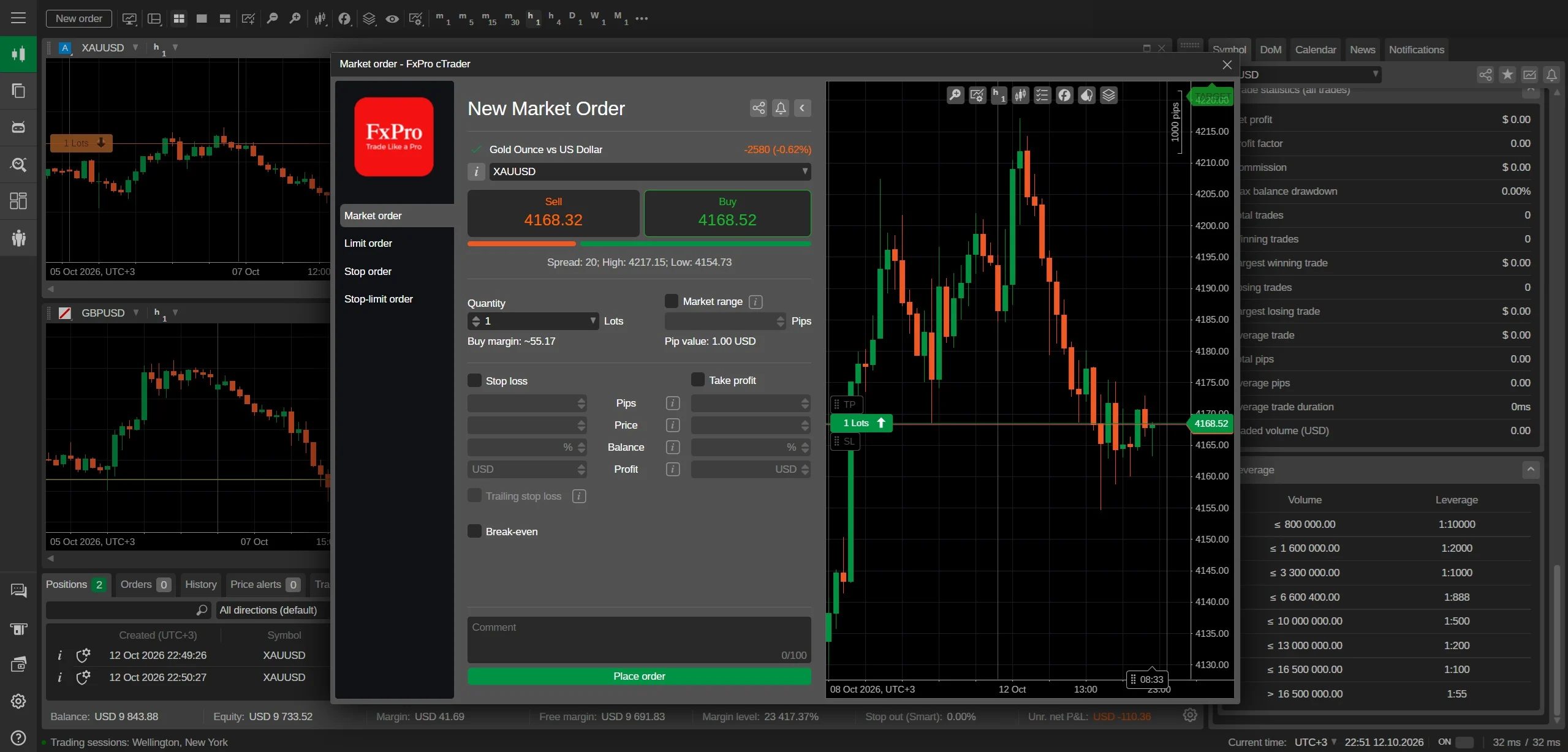
Finding XAU/USD in the terminal
Open the Market Watch window in MT4 or MT5, right-click and choose 'Show All', then type XAUUSD in the search bar. In cTrader, use the search box in the left-hand product list and type XAUUSD. The symbol appears as one instrument; if you see multiple gold symbols, choose the one with the suffix matching your account type — often 'XAUUSD' without a suffix on FxPro.
Drag the symbol onto the chart or click 'New Order' to open the ticket. The contract size is 100 oz per lot, and one pip is 0.01, meaning a one-pip move on one standard lot equals A$1.40 at an exchange rate of 0.70. Check the contract specification panel in the terminal to confirm the exact pip value for your account currency before you place a trade.
Sizing the order with our calculators
Our position size calculator asks for your account balance, risk percentage and stop-loss distance in pips, then returns the lot size. For a 0.10-lot gold position at reference price 4275.0, the notional value is A$61,071 if AUD/USD is 0.70, but the margin required is much smaller due to leverage. Use the margin calculator to see the exact margin for your chosen lot size and leverage — at 1:200, a 0.10-lot trade needs about A$213.75 if the AUD margin is double the USD figure.
Do not size by gut. A 0.10-lot gold trade moves A$14 per pip if one pip on a standard lot is A$14, so a 20-pip stop risks A$280. Use the pip value calculator to confirm that number for your account currency, then set the lot size so the risk is a fixed percentage of your balance. The calculator gives you the number before you act, not after.
Setting the exit with the entry
Place the stop-loss and take-profit in the same order ticket as the entry, not after the trade is live. For gold, use the daily range and recent swing highs or lows to place stops outside noise, not at round numbers like 4250.0 where stops cluster. A stop 20 pips away on a 0.10-lot trade risks A$280, so set the lot size from that risk first.
If you plan to hold gold overnight, include the swap cost in your take-profit target. A target of 30 pips may look like A$420 profit, but two nights of negative swap could reduce it. Use the profit calculator with a swap estimate to see the net result. Then set the exit and leave it — adjusting stops after entry usually widens risk, not narrows it.
Picking the correct XAU/USD symbol in the platform
The correct symbol for spot gold is usually XAUUSD or GOLD, but several variants can appear, each with different quoting conventions or liquidity. In FxPro’s MT4, MT5, cTrader and app, the standard spot gold CFD is typically labelled XAUUSD, while GOLD may be a different contract type or feed. Always check the contract specification for each symbol before trading, because a symbol with a suffix such as .m or .pro can have different spreads, execution or minimum trade sizes.
The reason there may be several gold symbols is that brokers often offer both spot and futures-style CFDs, or multiple liquidity feeds for different account types. One symbol may reflect the OTC spot market with variable spreads, while another tracks a futures contract with an expiry date. On FxPro, symbols can also differ between MT4, MT5 and cTrader because each platform connects to a separate liquidity pool, so the exact ticker name and its characteristics can vary even for the same underlying gold price.
To avoid trading the wrong instrument, open the symbol’s specification window and confirm that the contract size is 100 oz per lot and that the pip value matches 0.01 per 1.0 price move for one standard lot. Also check the trading hours and whether the symbol has any commission or only a spread. If a symbol shows a contract size different from 100 oz, it is not the standard spot gold CFD discussed on this page, and you should switch to the XAUUSD symbol that matches your account type.
What one lot of gold actually controls
One standard lot of XAU/USD controls 100 troy ounces of gold, so at the reference price of 4275.0 the notional value of the position is A$427,500. Because one pip is 0.01 in the gold price, a one-pip move on a standard lot changes the position value by exactly A$1.00. This fixed pip value makes it simple to calculate risk: if your stop is 50 pips away, the potential loss on one lot is A$50 before costs.
The margin required to open one lot depends on the leverage your account offers and the current gold price. The worked example given is that at 1:200 leverage, a 0.10-lot position needs about A$85.50 margin, which means one full lot would require roughly A$855.00. However, margin is recalculated continuously as the gold price moves, so a sharp move against your position can increase the margin requirement and trigger a margin call if your free margin falls too low.
Because one lot of gold is a large exposure for most retail accounts, many traders in Australia use smaller sizes such as 0.01 or 0.10 lots. A 0.01 lot controls 1 ounce, with a pip value of A$0.01, while a 0.10 lot controls 10 ounces and has a pip value of A$0.10. Choosing the right lot size based on your account balance and stop distance is essential, because gold can move several dollars in minutes during volatile sessions.
Attaching a stop loss before the order goes live
The stop loss should be set in the order window at the moment of entry, not added after the trade is open. In MT4, MT5, cTrader and the FxPro app, the order ticket has a Stop Loss field where you enter the exact price at which you want to exit if the market moves against you. Doing this before confirming the order ensures that every position is protected from the first second, even if you are not watching the screen.
Setting the stop at entry also forces you to define your risk in advance, because the stop distance determines the dollar loss per lot. For gold, each 0.01 move is A$1.00 per standard lot, so a stop 100 pips away means A$100 of risk per lot. By entering the stop price before submitting the order, you can see the potential loss in the platform’s trade preview and adjust the lot size until the risk fits your account rules.
A stop entered at the order stage is held on the broker’s server and will be executed even if your own device loses connection. If you add the stop later, there is a window where the position is unprotected, and a fast gold move could cause a much larger loss than intended. Always use the order ticket’s stop field, and never rely on manual monitoring as a substitute for a pre-set stop loss.
Reading the swap line when a gold trade stays open overnight
The swap line shows the interest adjustment credited or debited to your account when a position is held past the daily rollover time, usually around 5pm New York time. For gold, the swap is typically quoted in points or in the account currency, and it can be either positive or negative depending on whether you are long or short and on the prevailing interest rate differential between the currencies in the pair. In the platform, you can see the current swap rate in the symbol’s specification window.
A negative swap means you pay a small amount each night to keep the position open, while a positive swap means you receive a credit. The exact amount depends on the broker’s own rate, the size of your position, and how many nights the trade is held, including triple swaps on certain days such as Wednesday or Friday. Because gold is a non-yielding asset, the swap often reflects the cost of financing the notional value, so a long position may incur a debit while a short position may receive a credit, but this can change with market conditions.
Before holding a gold trade overnight, check the swap rate in the platform and calculate the cost in Australian dollars. For a 0.10 lot position, a swap of a few dollars per night can add up over weeks, reducing profit or increasing loss. If you are trading on a short-term basis, you can avoid swap altogether by closing before the rollover time, but if you plan to hold for days, the swap must be included in your total cost estimate.
Locating the correct XAU/USD symbol among the platform's gold listings
The correct symbol for spot gold on FxPro is usually XAUUSD, and the platform may also display alternatives like GOLD, GOLD.oz, or XAU/USD.oz depending on the server and account type. Always check the contract specification panel for each symbol before trading, because the pip value, contract size, and swap charges can differ between them. If you search for 'gold' in the Market Watch window on MT4 or MT5, you will often see more than one entry, and only the one labelled with your account's base currency and the correct contract size is the tradable spot price you want.
Several symbols can appear because FxPro offers different instruments for gold, including spot gold and gold futures, and these may be listed under different naming conventions depending on the platform. For example, MT4 might show XAUUSD for spot gold, while cTrader could list it as XAU/USD, and the FxPro app might use GOLD. The difference matters because a futures contract has an expiry date and a different pricing basis, whereas spot gold rolls over with swaps. Always open the symbol's details and verify that the contract size is 100 oz and the pip is 0.01 before placing an order.
To find the right symbol quickly, type 'XAU' into the Market Watch search bar on MT4 or MT5, and then right-click the symbol and select 'Specification' to check the contract size and tick value. On cTrader, use the 'Find' box and look for XAU/USD, then open the symbol settings to confirm the trade size. The FxPro app groups gold under 'Metals' or 'Commodities', so you may need to expand that category. If you are unsure, a test order of 0.01 lots will show the margin and pip value in the order window, allowing you to confirm you have the correct instrument without risking significant capital.
The contract size behind one lot of gold and what it means for margin
One standard lot of XAU/USD at FxPro controls 100 troy ounces of gold, so each one-pip movement (0.01 in the price) changes the position value by A$1 when your account is denominated in Australian dollars. At a reference price of 4275.0, one lot has a notional value of A$427,500, which means the margin required depends on your leverage. With 1:200 leverage, the margin for a full lot would be A$855, but a smaller 0.10-lot position needs only about A$85.50. Always calculate the notional value before trading, because gold's high price makes even small lot sizes significant.
The contract size of 100 oz is standard across most brokers for spot gold, but the pip value for one lot is A$1 in an AUD-denominated account because each 0.01 price move equals 1 oz of gold in value. This means a 0.10-lot position has a pip value of A$0.10, and a 0.01-lot micro position has a pip value of A$0.01. Understanding this helps you set appropriate stop-loss distances, because a stop 100 pips away on a full lot would risk A$100, while the same stop on a 0.10-lot position risks only A$10. The contract size does not change, but your risk per pip scales directly with the lot size you choose.
Margin for a gold trade is calculated as the notional value divided by the leverage, so at 1:200 a 0.10-lot position with a notional value of A$42,750 requires A$85.50 in margin. If your account leverage is different, the margin requirement changes proportionally; for example, with lower leverage the same 0.10-lot position would require more margin. The worked figure of A$85.50 at 1:200 is a useful benchmark, but always check the current margin requirement in the platform before placing an order, because leverage can be changed per instrument and margin may increase during high volatility. Never risk more than you can afford, as gold can move sharply and margin calls are a real possibility.
Setting a stop loss at the moment of entry to protect against gold's volatility
You should attach a stop loss to your gold order before sending it to the market, not after, because gold can gap and move rapidly, and an unprotected position can lose more than your initial margin. On MT4 and MT5, the order window has a 'Stop Loss' field where you can enter a price level or a distance in pips from the entry. On cTrader, you can set a stop loss in the order ticket or use a stop-loss order type. By setting the stop at entry, you define your maximum loss in advance, which is essential for risk management on a volatile instrument like XAU/USD.
Setting the stop at entry means you decide your risk before the trade goes live, and the stop should be placed at a technical level such as below a recent swing low for a long trade or above a swing high for a short trade. For example, if you enter a long gold trade at 4275.0 and the recent low is 4260.0, a stop at 4259.5 would give a 15.5-pip risk, which on a 0.10-lot position equals A$15.50. The stop loss field in the order window allows you to enter the exact price, and the platform will calculate the potential loss in your account currency. Always ensure the stop is beyond normal market noise to avoid being stopped out prematurely.
A stop loss placed at entry is a market order that becomes active as soon as your position is opened, and it will be executed at the best available price if the market reaches that level, though slippage can occur during fast markets. On FxPro's platforms, you can also use a trailing stop after entry, but the initial stop should be fixed and based on your risk tolerance and the trade setup. The key is to never move your stop further away to avoid a loss, as this increases your risk beyond what you planned. If you use the FxPro app, the order ticket includes a stop-loss field with a slider or direct price input, making it easy to set the stop before you press buy or sell.
Interpreting the swap line for gold positions held overnight
The swap line on an open gold position shows the interest rate differential that is credited or debited each day the position is held past the rollover time, usually 5pm New York time. For XAU/USD, the swap is based on the difference between the interest rates of the US dollar and the implicit lease rate of gold, plus the broker's markup. If you are long gold, you may pay a swap because you are borrowing USD to buy gold, while a short position might earn a swap. The swap amount is shown in the account currency and is applied as a cash adjustment to your balance, not to the position's unrealised P/L.
To read the swap line in MT4 or MT5, open the 'Terminal' window, go to the 'Trade' tab, and right-click on your position, then select 'Properties' or look at the 'Swap' column. A negative number means you are being charged for holding the position overnight, while a positive number means you are being paid. On cTrader, the swap is shown in the position details under 'Swap'. The swap rate is typically quoted in points or in the account currency per lot, and for gold it can be significant because the notional value is high. Always check the swap rate in the symbol specification before holding a gold trade overnight, as it can erode profits on long-term positions.
The swap for gold is calculated as: swap rate in points × pip value × lot size, and it is applied at the end of each trading day. For example, if the long swap rate is -30 points and you hold a 0.10-lot gold position, the daily charge would be 30 × A$0.10 = A$3.00. On Wednesday, the swap is often tripled to account for the weekend, so a position held from Wednesday to Thursday will incur three days of swap. The swap line is not a fee for using a stop loss; it is purely the cost or benefit of carrying the position overnight. If you plan to hold gold for more than a day, factor the swap into your trading plan.
checked 2026-09-29 · FxScouts, SafeForex, FxPro
See FxPro in action
FxPro gives Australian traders MT4, MT5, cTrader, and its own app. Australian traders can fund via PayID or bank transfer and start with a low entry.
See FxPro trading conditions →