
How to Choose a Trading Platform in Australia
The best platform is the one that matches how you trade, what you pay, and what you can automate.
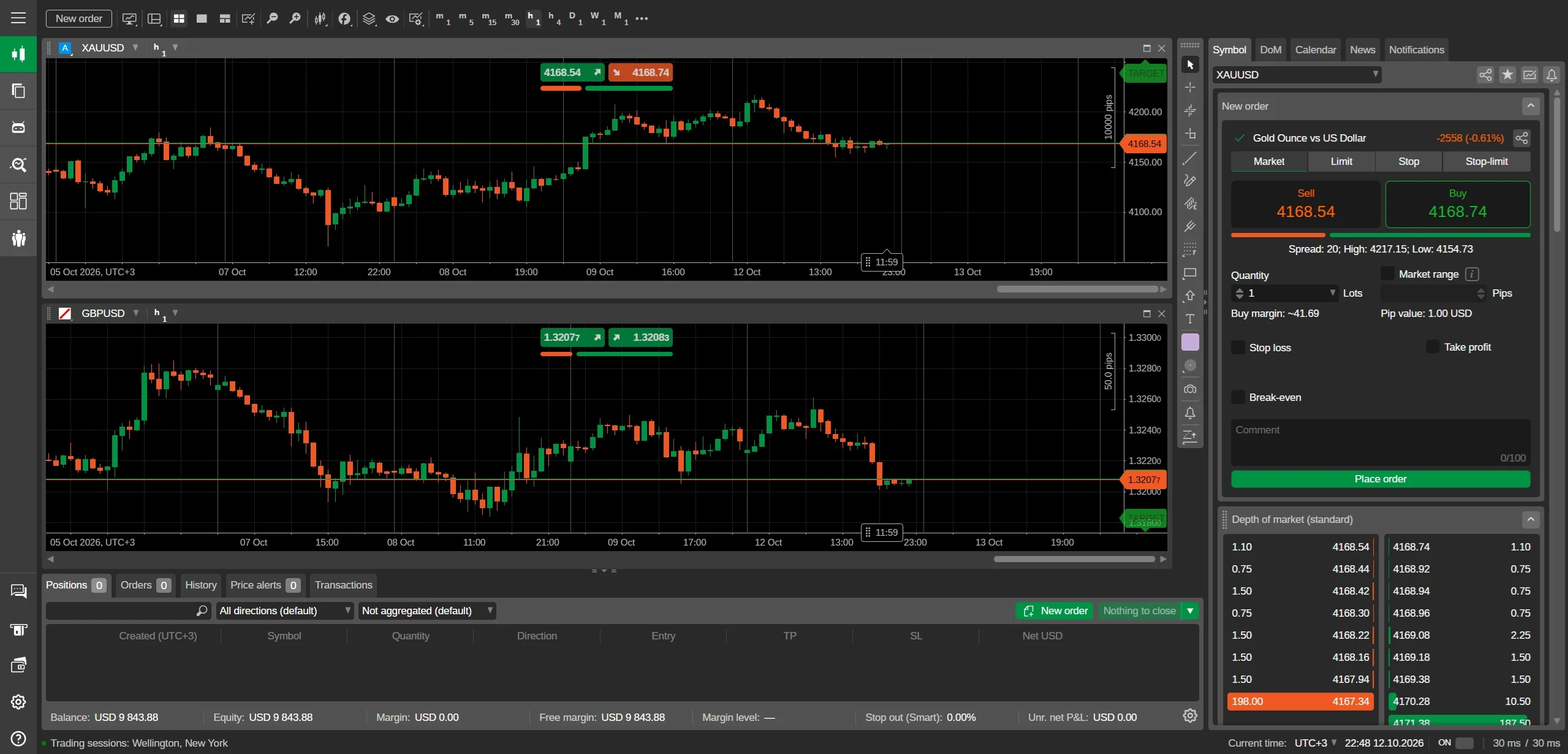
What a platform actually does for you
A trading platform is your order entry, charting, and automation workspace, but the key differences are in order types and execution models. Market, limit, stop, and trailing stop orders are standard, while one-cancels-other (OCO) and bracket orders let you manage risk without watching every tick. Check whether the platform supports partial fills and order expiry, because these affect how precisely you can enter and exit.
Automation separates casual platforms from serious ones. Expert Advisors (EAs) on MetaTrader run fully automated strategies, while cTrader's cBots offer C#-based automation with finer control. If you intend to backtest before risking money, ensure the platform has a reliable strategy tester with tick data. For discretionary traders, custom indicators and drawing tools matter more than automation.
Mobile versus desktop: when each one wins
Desktop platforms remain the workhorse for multi-chart analysis, custom indicators, and complex order placement. If you trade from a desk with multiple monitors, MT4 or MT5 on Windows or Mac gives the deepest feature set, including offline charting and advanced alert systems. cTrader's desktop app is equally capable but leans toward a cleaner, more modern interface.
Mobile apps are no longer just for monitoring; they can execute full orders and manage positions. FxPro's mobile app and MetaTrader mobile versions offer one-tap trading, price alerts, and interactive charts. For Australians who check positions on the go, a mobile app with biometric login and push notifications is practical. However, complex automation and backtesting remain desktop-only tasks.
Costs you can see, and costs we won't guess
Platform choice affects your trading costs through spreads and commissions. Standard accounts on MT4 or MT5 typically have wider spreads but no commission, while Raw+ and cTrader accounts offer from 0.0 pips plus a commission per lot. For gold, a 0.10-lot position at 1:200 leverage needs about A$85.50 margin, but your exact margin depends on leverage and account currency.
We deliberately do not publish a single spread or commission figure because they change with market conditions and account type. Instead, use our margin calculator and pip value calculator to work out your own costs. For a gold trade, enter 100 oz per lot and a pip of 0.01 to see profit per move. That gives you a personal number, not a marketing average.
Matching platform to your trading style
Day traders need fast order entry, one-click trading, and reliable execution, so MT4 or cTrader with a Raw+ account suits scalping. Swing traders and position traders benefit from MT5's extra timeframes and economic calendar integration. If you trade CFDs on shares, indices, and commodities, MT5's multi-asset capability is an advantage. Copy trading is not native to these platforms, but cTrader has a social trading feature.
For Australians, the regulatory context matters. FxPro is licensed by the FCA (UK) and CySEC, but it does not hold an ASIC licence, so Australian residents deal with an offshore entity. This does not make the broker unsafe, but it changes your protections. Check this before funding, and note that funding is via bank transfer or card, not any local payment rail, though deposits and withdrawals are free.
Practical differences between MT4, MT5, cTrader and the FxPro app
The clearest practical difference is what each platform was built for. MT4 is the oldest and has the largest library of custom indicators and Expert Advisors, so it suits traders who want to automate or install third-party tools. MT5 adds more order types, more timeframes and a built-in economic calendar, which suits traders who want deeper market analysis without leaving the platform. cTrader is faster to execute and has a more modern charting interface, appealing to traders who prioritise speed and a clean workspace. The FxPro app is a simplified mobile companion for checking positions and placing orders on the go, not a full analysis suite.
The charting and order entry differ in ways that matter daily. MT4 uses a single-threaded strategy tester and four pending order types, while MT5 offers six pending order types and a multi-threaded tester, which is faster for backtesting. cTrader’s charting includes detachable charts and a depth-of-market ladder that shows liquidity at each price level, which MT4 lacks. The FxPro app provides basic charts and one-tap trading but no custom indicators. For gold trading specifically, all platforms show XAU/USD with a pip of 0.01, but cTrader’s DOM can help you see the spread at different volumes before you commit a 0.10-lot order.
Switching between platforms is free but not instant. All four are available from the same FxPro account, so you can install MT4 and cTrader side by side and compare them with the same balance. However, indicators, templates and Expert Advisors do not transfer between platforms; an MT4 custom indicator will not work in MT5 or cTrader. For a gold trader, the choice often comes down to automation needs: MT4 if you rely on a specific EA, MT5 if you want more order types, cTrader if you want speed and transparency, and the app if you only need to monitor positions while away from your desk.
The real cost of switching platforms later
Switching platforms at FxPro costs nothing in fees, but it can cost time and opportunity. You can move between MT4, MT5, cTrader and the app without paying a transfer charge or opening a new account. Your balance, open positions and order history remain intact because they live on FxPro’s servers. The cost arises from re-building your setup: reinstalling custom indicators, re-creating chart templates, and re-testing any automated strategies. For a gold trader using a specific MT4 Expert Advisor, moving to cTrader means finding or coding an equivalent cBot, which can take hours or days, during which you may miss a move in XAU/USD.
Another hidden cost is the learning curve, especially for order types and market depth. MT4 and MT5 share a similar layout, so switching between them is quick. Moving from MT4 to cTrader is steeper because cTrader uses a different order ticket, a depth-of-market ladder, and a different scripting language for automation. For example, a trader used to MT4’s simple market order may need time to understand cTrader’s advanced protection options like stop-loss and take-profit in pips or price. While you learn, you may trade more cautiously or make entry errors, which can be more expensive than any platform fee, particularly in a volatile market like gold.
The cost of switching is lowest if you test early and keep your setup portable. Before committing real money, open a demo account on two platforms and run the same gold strategy side by side for a week. Note which indicators you actually use and whether they exist on the other platform. Keep a simple trading journal in a spreadsheet, not inside the platform, so it follows you. If you rely on automation, verify that your EA or cBot performs identically on the same XAU/USD data. By doing this before you build a complex setup, you avoid the biggest switching cost: having to abandon a tool that works when you need it most.
What to test on a demo before funding a live gold account
Test the spread on XAU/USD at different times of day, not just once. Gold spreads at FxPro vary with market liquidity; they are typically wider during the Sydney open and around major news events like US CPI or non-farm payrolls. On a demo account, place a 0.10-lot order at 9 am Sydney time and again at 11 pm Sydney time, and compare the entry price. The difference tells you the real cost of trading at your preferred hours. A trader who only checks the spread at midday may be surprised by a wider spread when they actually trade after work, which directly reduces profit on a 100-ounce lot.
Test the margin requirement and how the maximum leverage cap in Australia affects your free margin. The leverage available is up to 1:200, not a higher offshore ratio, so the margin needed for a given gold position is larger than on some overseas accounts. On demo, open a 0.10-lot gold trade at the reference price of 4275.0 and watch how your free margin changes when the price moves 100 pips against you. This shows the real buffer before a margin call. Also test partial closes and stop-loss placement; some platforms let you set a stop in pips, while others require a price. A stop 100 pips away on gold means a $10 loss per 0.10 lot, which you should confirm on the demo before risking real money.
Test the execution speed and order types you plan to use. On a demo account, place a market order on XAU/USD during a fast-moving minute, such as a US data release, and time how long it takes to fill. Then test a buy limit and a sell stop to see if they trigger at the exact price you set. This matters because gold can jump several pips in a second, and a slow fill on a 1-lot order means a larger slippage cost. Also test the mobile app for one-tap closing; if you plan to manage trades from your phone, ensure the app closes a position in one tap and shows your profit in A$, not just USD.
Support questions to ask before opening a gold trading account
Ask how FxPro handles negative balance protection and margin close-outs on gold. Since FxPro is regulated by the FCA and CySEC but not ASIC, Australian residents deal with an offshore entity, so you need to confirm whether negative balance protection applies to your account. Ask for the exact margin call and stop-out levels as a percentage, and what happens if a gold position gaps through your stop. A direct question: if I hold 1 lot of XAU/USD and the price gaps $50 against me overnight, will my account go negative and will I owe money? The answer determines your maximum risk on a single trade.
Ask about deposit and withdrawal methods in A$ and any currency conversion fees. You can fund via bank transfer or card, but ask how long a bank transfer deposit takes to reflect in your trading account and whether withdrawals to an Australian bank account are free. Also ask if you can hold your account in AUD to avoid conversion on every trade, or if gold positions are always settled in USD. For example, if you deposit A$1,000 and open a 0.10-lot gold trade, ask whether the margin is calculated in USD and converted at the prevailing rate, and whether the conversion cost is included in the spread or charged separately.
Ask about the specific entity that will hold your account and how disputes are handled. FxPro has entities regulated by the FCA (UK) and CySEC, but not ASIC. Ask which entity will onboard you as an Australian resident, and get the full legal name and registration number. Then ask what happens if you have a complaint: is there an external ombudsman, and which country’s laws apply? Also ask for a written confirmation of the leverage limit for gold on your account type, because the maximum available to Australian residents is up to 1:200, but the exact setting depends on the entity and your classification. These answers protect you before you send money, and they are questions a legitimate broker will answer without hesitation.
Practical differences that matter when you trade gold
In practice, the platforms diverge most in order execution and how you manage a gold position. MT4 is the workhorse for manual traders: depth of market is limited, but one-click trading and the huge library of gold-specific indicators make it predictable. MT5 adds more order types and a built-in economic calendar, which helps if you trade gold around Australian session news. cTrader shows full market depth and its charting is smoother for scalping the 0.01 pip moves in XAU/USD. The FxPro app is deliberately simpler — useful for monitoring an open 1-lot position (100 oz) and closing it quickly, but not for building a detailed gold strategy.
The real difference shows in how each platform handles a stop-loss on gold. With MT4 you set a stop as a price level, and it sits on the broker’s server; with MT5 you can also attach a stop-limit order, which is useful when A$ volatility spikes around RBA announcements. cTrader’s depth-of-market lets you see liquidity before you enter a 0.10-lot gold trade, which at the maximum 1:200 leverage available in Australia requires a margin that depends on the current price and is larger than on higher-leverage offshore accounts. None of these platforms guarantee slippage-free fills on gold, and the exact spread you pay depends on market conditions and the entity you are under, not on the platform itself.
For Australian traders, the platform choice also affects how you see your P/L. MT4 and MT5 display profit in the account currency, which means a 1-pip move (0.01) on one standard lot of gold is a US$1 change that is then converted to A$ at the prevailing rate. cTrader can show both base and quote currency P/L, so you see the raw USD result before conversion. The FxPro app rounds figures for a quick read. This matters because gold is priced in USD, and the A$ conversion can mask a small loss or gain if you are watching a phone screen rather than a desktop chart.
What switching platforms costs you in time and money
Switching platforms later usually costs you nothing in direct fees, but it can cost you your trading history and custom setup. If you move from MT4 to cTrader, your saved chart templates, expert advisors and one-click gold presets do not transfer. You will spend at least an hour rebuilding a 0.10-lot gold order ticket with the correct stop distance, and you may lose the precise entry levels you used for A$ margin calculations. There is no charge from FxPro for opening a second platform account, but any open gold position must be closed or managed from the original platform until you are ready to switch cleanly.
The bigger cost of switching is the learning curve for order types and risk tools. MT4’s simple market order is enough for a 1-lot gold trade, but cTrader’s depth-of-market panel can confuse you into a larger size than intended if you misread the volume. A mistake on a 100 oz position at a reference price near 4275.0 is expensive, and the spread you pay on that mistake depends on current gold liquidity, not on any advertised number. Before you switch, test a 0.10-lot order on a demo account and confirm the margin requirement matches the roughly A$85.50 you expect at 1:200 leverage.
You also lose the rhythm you built with hotkeys and alerts. MT4 lets you set a sound alert when gold crosses a level, and cTrader’s alerts are more visual. Recreating those alerts takes time, and during that time you are not watching XAU/USD. There is no fee to switch, but the opportunity cost of missed gold moves is real. The platform does not change the underlying cost structure: you still pay a spread that varies with market conditions, and you still deal with an offshore entity if you are in Australia, because FxPro does not hold an ASIC licence. Check that before you move any live gold funds.
See FxPro in action
FxPro gives Australian traders MT4, MT5, cTrader, and its own app. Australian traders can fund via PayID or bank transfer and start with a low entry.
See FxPro trading conditions →